
The PayNet Open Finance Platform (OFP) enables secure, user-consented sharing of financial data between institutions. As a Data Provider, your institution sits at the heart of this ecosystem, you are the source of truth for your customers' financial data.
| Party | Role |
|---|---|
| Data Consumer (DC) | A third-party application (e.g. a PFM or lending platform) that requests access to a user's financial data |
| Data Provider (DP) | Your institution, you authenticate the user, obtain their consent, and return their financial data when requested |
| PayNet OFP | The intermediary platform that orchestrates consent, authentication, and secure data exchange between DC and DP |
How data flows to your institution:
Unlike a DC, which calls PayNet's APIs, as a Data Provider you primarily operate as a server that PayNet calls. PayNet OFP forwards requests to your endpoints (called webhooks) for actions like user authentication, consent notification, and data retrieval. Your responsibility is to implement these webhook endpoints correctly and respond according to the v1.2.2 specification.
PayNet OFP exposes two server components relevant to you:
Authorization Server (AS): manages the consent and authentication flow; your institution receives redirect webhooks and consent notifications from this component
Resource Server (RS): forwards data requests (accounts, balances, transactions) from DCs to your institution
Before you start, you can simulate the User Experience as an End User starting from DC Simulator, Paynet Aggregator, and DP Simulator, for Consent Initiation up to Retrieve Balance Flow.
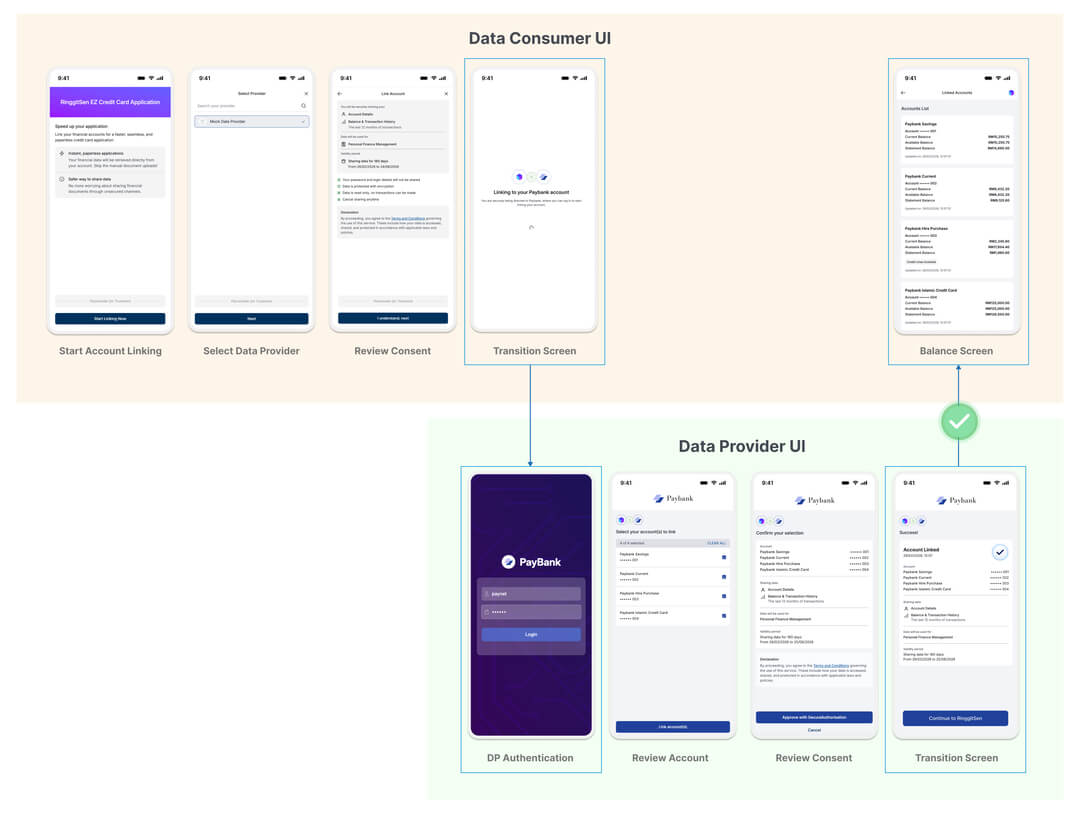
Run this Journey
paynetpaynetIn this period, PayNet will support manual onboarding for participants into PayNet Open Finance Platform.
PayNet OFP enforces financial-grade security protocols. As a DP, you are required to upload certificates for the following two protocols.
| Protocol | Purpose |
|---|---|
| mTLS | Mutual TLS, establishes authenticated, encrypted communication between your institution and PayNet OFP |
| JWS | JSON Web Signature, signs your API responses so PayNet and DCs can verify the data has not been tampered with |
How to Submit the Certificates:
Detailed instructions on how to submit the certificates will be provided during the onboarding process.
PayNet needs to know where to send requests. You must register the base URLs for both your Authorization Server and Resource Server endpoints.
How to Submit the API Base URL:
Detailed instructions on how to submit the API Base URL will be provided during the onboarding process.
All endpoints marked ✅ require Mutual TLS (mTLS). For outbound calls from your DP to PayNet, present your registered client certificate. For inbound webhook endpoints called by PayNet, your server must require and validate the client certificate presented by PayNet. Access tokens issued over mTLS are sender-constrained, so the same certificate used during token issuance must be presented on protected calls.
| Endpoint | Method | mTLS Required | Who Establishes mTLS | Notes |
|---|---|---|---|---|
/v1/oauth/jwks/paynet |
GET | ❌ | - | Public endpoint |
/v1/oauth/authorize |
GET | ✅ | PayNet -> DP | Inbound webhook |
/v1/oauth/userinfo |
GET | ✅ | PayNet -> DP | Inbound webhook |
/v1/oauth/jwks/{dc_id} |
GET | ✅ | PayNet -> DP | Inbound webhook |
/v1/health |
GET | ✅ | PayNet -> DP | Inbound health check |
/v1/consents/events |
POST | ✅ | PayNet -> DP | Inbound consent webhook |
/v1/accounts/{account_id} |
GET | ✅ | PayNet -> DP | Inbound account webhook |
/v1/accounts/{account_id}/balances |
GET | ✅ | PayNet -> DP | Inbound balances webhook |
/v1/accounts/{account_id}/transactions |
GET | ✅ | PayNet -> DP | Inbound transactions webhook |
/v1/consents/{consent_id} (Update Consent) |
PATCH | ✅ | DP -> PayNet | Outbound to PayNet |
/v1/consents/{consent_id} (Retrieve Consent) |
GET | ✅ | DP -> PayNet | Outbound to PayNet |
/v1/consents/{consent_id}/revoke |
POST | ✅ | DP -> PayNet | Outbound to PayNet |
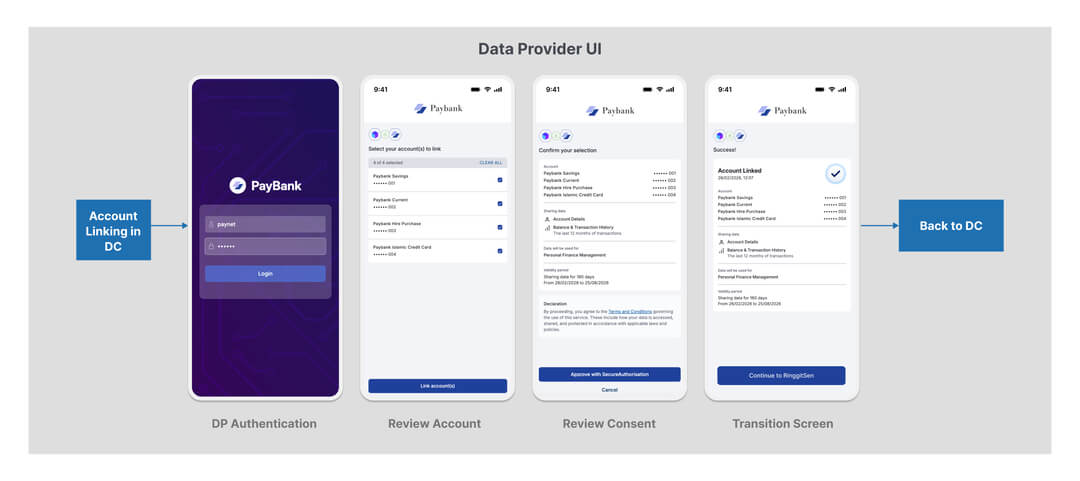
Your institution must provide a user-facing authorization interface, this is the login and consent approval page your customers see when they are redirected from a DC's application.
At minimum, this should include:
Refer to the sample of UI mockup provided below for the expected screen flows as a Data Provider:
As a DP, your role is fundamentally different from a DC. Rather than calling APIs, you are building the APIs that PayNet will call. The table below summarises every endpoint your institution must implement.
For Authorization Server token issuance, PayNet OFP supports two FAPI 2.0 client authentication methods for Data Providers:
private_key_jwttls_client_auth (Mutual TLS / mTLS)private_key_jwtUse these parameters when requesting tokens with JWT client authentication.
| Parameter | Required | Description |
|---|---|---|
client_assertion_type |
✅ | Must be urn:ietf:params:oauth:client-assertion-type:jwt-bearer |
client_id |
✅ | Registered Data Provider Client ID |
client_assertion |
✅ | Signed JWS client assertion |
The signed JWS must comply with the following structure.
JWS Header
| Element | Required | Description |
|---|---|---|
alg |
✅ | Must be PS256 |
kid |
✅ | Base64url-encoded SHA-256 thumbprint (x5t#S256) of your X.509 certificate |
JWS Body (Claims)
| Claim | Required | Description |
|---|---|---|
iss |
✅ | Client ID |
sub |
✅ | Client ID |
aud |
✅ | Authorization Server issuer value from /.well-known/openid-configuration |
exp |
✅ | Expiry Unix timestamp (maximum 10 minutes from iat) |
iat |
✅ | Issued-at Unix timestamp |
jti |
✅ | Unique JWT ID used to prevent replay attacks |
nbf |
Optional | Not-before Unix timestamp |
tls_client_authWhen using mTLS client authentication, your DP establishes mTLS and includes:
| Parameter | Required | Description |
|---|---|---|
client_id |
✅ | Registered Data Provider ID |
| Endpoint | Auth Required | Notes |
|---|---|---|
GET /v1/oauth/jwks |
❌ Not Required | Public endpoint |
OST /token (client credentials) |
✅ Required | private_key_jwt or tls_client_auth — to obtain client access token |
POST /v1/consents/{consent_id} (Update Consent) |
❌ Not required at AS level | Authenticated via Bearer client access token in Authorization header |
GET /v1/consents/{consent_id} (Retrieve Consent) |
❌ Not required at AS level | Authenticated via Bearer client access token |
POST /v1/consents/{consent_id}/revoke (Consent LCM) |
❌ Not required at AS level | Authenticated via Bearer client access token |
| Endpoint | Auth Required | Notes |
|---|---|---|
GET /v1/oauth/authorize (Webhook Authorization) |
❌ Not Required | PN presents signature in query param |
GET /v1/oauth/userinfo (Webhook User Info) |
❌ Not required | Protected by mTLS from OFP |
GET /v1/health (Health Check) |
❌ Not required | Called by OFP |
POST /v1/consents/events (Consent Event) |
❌ Not required | Protected by mTLS; DP must verify JWS signature with PN cert |
GET /v1/accounts/* (Account Webhooks) |
❌ Not required | Protected by mTLS; DP must verify JWS x-signature with DC cert |
Important for DP webhook endpoints: While these endpoints do not require outbound client authentication by the DP, the DP must protect all webhook endpoints with Mutual TLS and validate the incoming JWS signature using the appropriate certificate (PN cert for consent events; DC cert for account webhooks).
These webhooks are triggered before any financial data is exchanged. They cover the moment a consent request arrives at your institution through to the point where your customer has authenticated and made their decision. Your institution must handle both correctly for the consent to reach an authorized state.
Sequence Overview
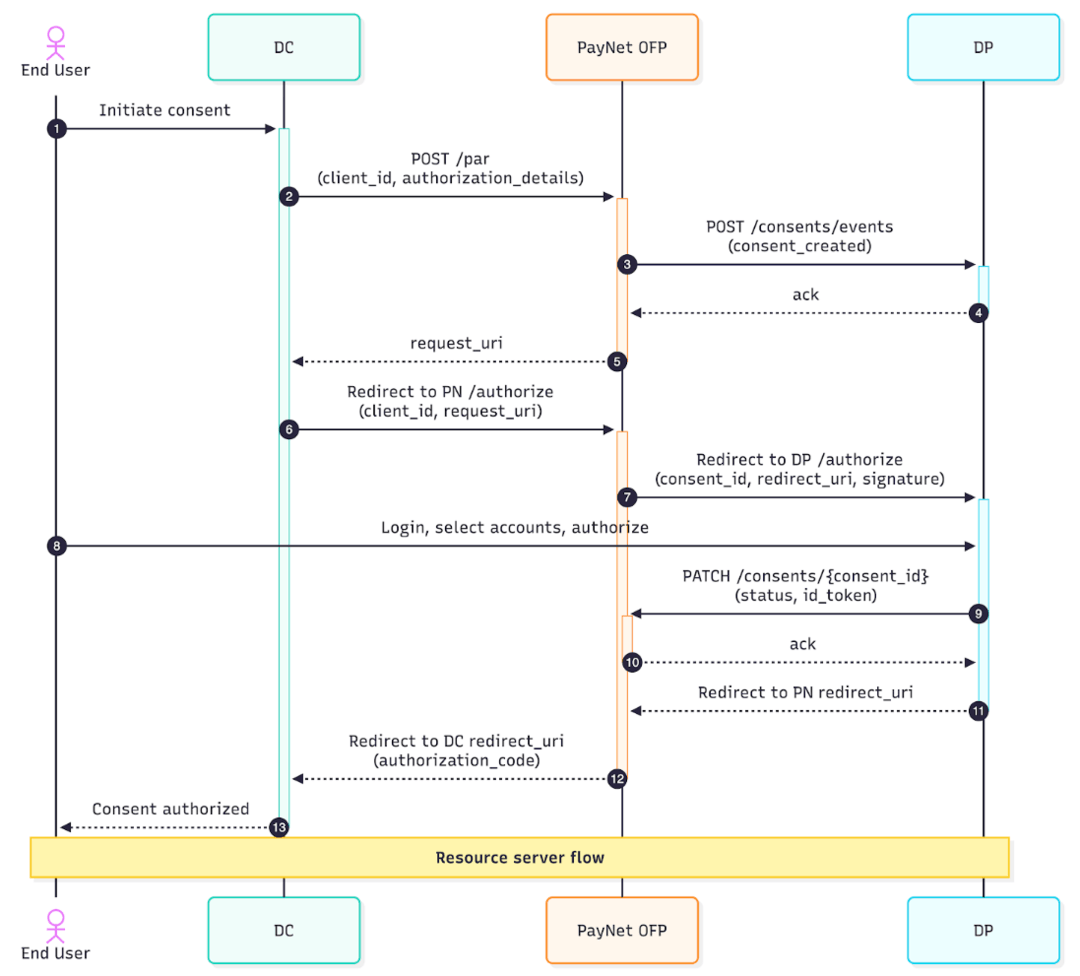
Step 3 to 4: Receiving & Handling a Consent Event
When a DC initiates a consent request (by calling PayNet's PAR endpoint), PayNet immediately notifies your institution with the details of that consent. Your institution must be ready to receive and process this notification.
Endpoint your institution must expose:
POST https://{DP_URL}/v1/consents/eventsWhat the payload contains:
| Field | Description |
|---|---|
event_type |
The type of consent event (e.g. consent created, updated, revoked) |
data |
The full Consent object, including consent_id, dc_id, dp_id, permissions requested, and consent duration |
🔒 This is the request from PayNet to your DP which must be made over mTLS using the certificate bound to your client_id.
curl --location --request POST 'https://{DP_URL}/v1/consents/events' \
  --cert /path/to/client.crt \
  --key /path/to/client.key \
  --cacert /path/to/ca.crt \
  --header 'Content-Type: application/json' \
  --header 'x-fapi-interaction-id: 550e8400-e29b-41d4-a716-446655440000' \
  --header 'x-fapi-signature: eyJhbGciOiJQUzI1NiIsImtpZCI6IkFCQ0RFRkdISUpLTE1OT1BRUlNUVVZXWFlaYWJjZGVmZ2g....<JWS_COMPACT_SERIALIZATION>' \
  --data-raw '{
    "event_type": "consent_status_updated",
    "data": {
      "consent_id": "550e8400-e29b-41d4-a716-446655440001",
      "dc_id": "dc-550e8400-e29b-41d4-a716-446655440002",
      "dp_id": "dp-550e8400-e29b-41d4-a716-446655440003",
      "id_type": "nric",
      "hashed_id_number": "eHh4eHh4eHh4eHh4eHh4eHh4eHh4eHh4eHh4eHh4eA==",
      "consent_type": "account_access_consent",
      "consent_purpose": "pfm",
      "permissions": [
        "read_accounts",
        "read_balances",
        "read_transactions"
      ],
      "expiration_datetime": "2025-12-31T23:59:59Z",
      "status": "authorized",
      "accounts": [
        {
          "account_id": "acc-550e8400-e29b-41d4-a716-446655440010",
          "account_reference": "1234567890",
          "account_name": "Savings Account"
        }
      ],
      "created_at": "2025-03-05T08:00:00Z",
      "updated_at": "2025-03-05T09:00:00Z",
      "updated_by": "data_provider_user"
    }
  }'
What your institution must do:
consent_id⚠️ This endpoint is called at every stage of the consent lifecycle, creation, modification, and revocation. Your institution must handle all event types and update your internal consent state accordingly.
Step 7: Authenticating the User (Authorization Webhook)
After the DC's user initiates the consent flow, PayNet redirects the user's browser to your institution's authorization page. This is where your customer logs in, selects accounts to share, and approves or rejects the consent.
Endpoint your institution must expose:
GET https://{DP_URL}/v1/oauth/authorizePayNet will supply the following in the request:
| Parameter | Description |
|---|---|
consent_id |
The ID of the consent being authorized, use this to retrieve the consent details you stored in Step 4.1 |
redirect_uri |
PayNet's callback URI, redirect the user's browser back to this URL after they complete authorization |
signature |
A JWS signed by PayNet, verify this before processing the request |
🔒 This is the request from PayNet to your DP which must be made over mTLS using the certificate bound to your client_id.
curl --location --request GET \
  'https://{DP_URL}/v1/oauth/authorize?consent_id=550e8400-e29b-41d4-a716-446655440001&redirect_uri=https%3A%2F%2Fopenfinance.paynet.my%2Fv1%2Foauth%2Fcallback&signature=eyJhbGciOiJQUzI1NiIsImtpZCI6IkFCQ0RFRkdISUpLTE1OT1BRUlNUVVZXWFlaYWJjZGVmZ2g....<JWS_COMPACT_SERIALIZATION>' \
  --cert /path/to/dp-client.crt \
  --key /path/to/dp-client.key \
  --cacert /path/to/ca.crt \
  --max-redirs 0 \
  --verbose
Step 9: Update consent to PayNet
POST /v1/consents/{consent_id}) with the authorized account list and updated consent status, then redirect the user's browser to the redirect_uriredirect_uri with an appropriate error🔒 This request must be made over mTLS using the certificate bound to your client_id.
curl --location --request PATCH \
  'https://{RS_URL}/v1/consents/550e8400-e29b-41d4-a716-446655440001' \
  --cert /path/to/dp-client.crt \
  --key /path/to/dp-client.key \
  --cacert /path/to/ca.crt \
  --header 'Content-Type: application/json' \
  --header 'x-fapi-interaction-id: 550e8400-e29b-41d4-a716-446655440000' \
  --header 'x-fapi-signature: eyJhbGciOiJQUzI1NiIsImtpZCI6IkFCQ0RFRkdISUpLTE1OT1BRUlNUVVZXWFlaYWJjZGVmZ2g....<JWS_COMPACT_SERIALIZATION>' \
  --data-raw '{
    "status": "authorized",
    "id_token": "eyJhbGciOiJQUzI1NiIsImtpZCI6ImRwLWtleS1pZC0wMDEifQ.eyJpc3MiOiJodHRwczovL2RwLmJhbmsuY29tIiwic3ViIjoidXNlci0xMjM0NTYiLCJhdWQiOiJkYy01NTBlODQwMC1lMjliLTQxZDQtYTcxNi00NDY2NTU0NDAwMDIiLCJleHAiOjE3NDE2Nzc0MDAsImlhdCI6MTc0MTY3NjgwMCwiYXV0aF90aW1lIjoxNzQxNjc2NzAwLCJpZF90eXBlIjoibnJpYyIsImhhc2hlZF9pZF9udW1iZXIiOiJlSGg0ZUhoNGVIaDRlSGg0ZUhoNGVIaDRlSGg0ZUhoNGVIaDRlSGg0ZUE9PSJ9.<DP_PRIVATE_KEY_SIGNATURE>",
    "user_identity": {
      "id_type": "nric",
      "hashed_id_number": "eHh4eHh4eHh4eHh4eHh4eHh4eHh4eHh4eHh4eHh4eA=="
    },
    "accounts": [
      {
        "account_id": "acc-550e8400-e29b-41d4-a716-446655440010",
        "account_number": "1234567890",
        "account_name": "My Savings Account"
      }
    ]
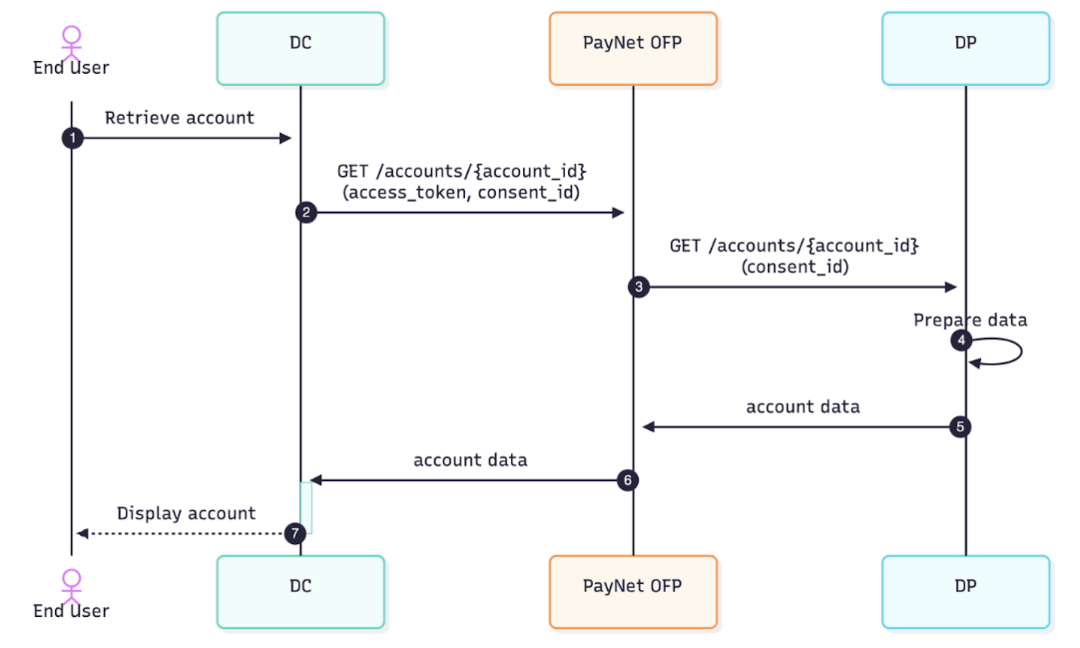
}'Once a user has approved consent, a DC can request financial data through PayNet. PayNet forwards these requests to your institution's Resource Server webhooks. Your institution must retrieve the relevant data, encrypt it using the DC's JWE certificate, and return it wrapped inside a JWS-signed response.
Sequence Overview
Account Balances Webhook
POST https://{DP_URL}/v1/accounts/{account_id}/balancesPayNet forwards a balance request from a DC. Your institution must:
kid)account_idx-enc-kid)Balance data to return:
| Field | Description |
|---|---|
account_id |
The unique account identifier assigned during authorization |
current_balance |
Real-time balance excluding pending transactions |
🔒 This is the request from PayNet to your DP which must be made over mTLS using the certificate bound to your client_id.
curl --location --request GET \
  'https://{DP_URL}/v1/accounts/acc-550e8400-e29b-41d4-a716-446655440010/balances?consent_id=550e8400-e29b-41d4-a716-446655440001' \
  --cert /path/to/paynet-client.crt \
  --key /path/to/paynet-client.key \
  --cacert /path/to/ca.crt \
  --header 'x-fapi-interaction-id: 550e8400-e29b-41d4-a716-446655440000' \
  --header 'x-enc-kid: <base64url-SHA256-thumbprint-of-DC-cert>' \
  --header 'x-fapi-signature: eyJhbGciOiJQUzI1NiIsImtpZCI6IkFCQ0RFRkdISUpLTE1OT1BRUlNUVVZXWFlaYWJjZGVmZ2g....<JWS_COMPACT_SERIALIZATION>'
💡 The same request-validation and JWS-wrapped JWE response pattern applies to the Account and Account Transactions webhooks. Refer to the full DP API Spec v1.2.2 for the complete field definitions.
This section applies to Data Consumers and Data Providers. It summarizes certificate usage, mTLS requirements, message signing, and security-related HTTP headers.
| Certificate Type | Description |
|---|---|
| PN Signature Certificate | PayNet signs payloads; receivers verify using PayNet public key from JWKS (use = sig). |
| DC Signature Certificate | DC signs applicable requests; receivers verify using DC public key from JWKS (use = sig). |
| DP Signature Certificate | DP signs responses; receivers verify using DP public key from JWKS (use = sig). |
| DC Encryption Certificate | DP encrypts payloads for DC using x-enc-kid; DC decrypts with matching private key (use = enc). |
During certificate rotation, old and new keys may coexist with different
kidvalues. Cache JWKS responses for up to 15 minutes.
mTLS is mandatory for protected integration paths.
| Endpoint | Method | mTLS Required | Caller Direction |
|---|---|---|---|
/v1/oauth/jwks/paynet |
GET | ❌ | Public |
/v1/oauth/authorize |
GET | ✅ | PayNet -> DP |
/v1/oauth/userinfo |
GET | ✅ | PayNet -> DP |
/v1/oauth/jwks/{dc_id} |
GET | ✅ | PayNet -> DP |
/v1/health |
GET | ✅ | PayNet -> DP |
/v1/consents/events |
POST | ✅ | PayNet -> DP |
/v1/accounts/{account_id} |
GET | ✅ | PayNet -> DP |
/v1/accounts/{account_id}/balances |
GET | ✅ | PayNet -> DP |
/v1/accounts/{account_id}/transactions |
GET | ✅ | PayNet -> DP |
/v1/consents/{consent_id} |
PATCH | ✅ | DP -> PayNet |
/v1/consents/{consent_id} |
GET | ✅ | DP -> PayNet |
/v1/consents/{consent_id}/revoke |
POST | ✅ | DP -> PayNet |
JWS protects message integrity and provides non-repudiation.
PS256 for signatures.kid to the certificate thumbprint (x5t#S256) used to sign payloads.iat/nbf/exp and replay-sensitive jti.| Header | Purpose |
|---|---|
x-signature |
JWS signature for message integrity and verification. |
x-enc-kid |
Indicates DC encryption key for DP response payload encryption. |
x-fapi-interaction-id |
Correlation ID for end-to-end tracing and troubleshooting. |
Authorization |
Bearer access token for protected endpoints. |
Content-Type |
application/jwt for JWS payloads (and JWE-wrapped response content when applicable). |
This is your primary integration test which will be initiated from Mock Data Consumer.
Pre-work Checklist
Before signalling readiness to test, confirm the following:
Backend Initiated Test
End-to-End Test Journey
The following table describes each step of the test, which party drives it, and the expected outcomes as per UI, Backend API, and API Integration Guide in the previous sections. You can focus on the bold rows for your DP testing purpose.
| Step | Actor | Action | UI Expected Outcome | DP Backend Expected Outcome |
|---|---|---|---|---|
| 1 | Mock DC | User navigates to the account linking screen | Linking screen displayed | - |
| 2 | Mock DC | User selects a Data Provider from the list | DP selection | - |
| 3 | Mock DC | User reviews consent details on DC UI | Consent review screen displayed as per request | - |
| 4 | Mock DC | User confirms and submits consent | User is redirected to Mock DP UI | - |
| 5 | Real DP | User is redirected to the Mock DP login page | Mock DP login screen displayed | Expose: /consents/events and /authorize |
| 6a | Real DP | User logs in with valid preset credentials (positive) | Login succeeds; account selection screen displayed | DP internal implementation |
| 6b | Real DP | User enters incorrect password (negative) | Login fails; error message displayed | DP internal implementation |
| 7 | Real DP | User selects one or more accounts to link | Accounts selected | DP internal implementation |
| 8 | Real DP | User reviews consent at the DP side | Consent review screen displayed | DP internal implementation |
| 9a | Real DP | User approves consent (positive) | User redirected to DP success page | Call Update Consent consents/{consent_id} with positive status |
| 9b | Real DP | User rejects consent (negative) | User redirected back to DC with rejection error | Call Update Consent consents/{consent_id} with negative status |
| 10 | Real DP | User gets Success confirmation and click Back to DC | User redirected back to DC with authorization_code | - |
| 11a | Mock DC | Consent approved callback received | DC retrieves and displays account balance | Expose /balance |
| 11b | Mock DC | Consent rejected callback received | DC displays "Account not linked" message to user | - |
Definition of Done
Your build is considered complete for this phase when all of the following have been demonstrated with your Certificates and Base URL setup:
POST /v1/consents/events), validates the incoming JWS signature, and returns the correct responseGET /v1/oauth/authorize), and your end user is correctly redirected through the DP authentication flow through to the point of consent approval or rejectionPATCH /v1/consents/{consent_id}) to PayNet appropriately, with a positive status on approval and a negative status on rejectionGET /v1/accounts/{account_id}/balances) is functional and returns the correct encrypted and signed responseThis phase verifies interoperability between your institution and a live DC in a controlled bilateral pairing session.
⚠️ Prerequisite: Your institution must have **passed all tests as a DP** before this phase can begin.
How to proceed:
Contact PayNet to schedule a bilateral testing session with a Real DC. PayNet will identify a suitable DC partner, facilitate the pairing, and provide guidance on the specific scenarios to execute together.
| Code | Description |
|---|---|
| 200 | OK |
| 201 | Created |
| 204 | No Content |
| 303 | Redirect |
| 400 | Bad Request |
| 401 | Unauthorized |
| 403 | Forbidden |
| 404 | Not Found |
| 405 | Method Not Allowed |
| 429 | Too Many Requests |
| 500 | Internal Server Error |
| 503 | Service Unavailable |
Returned in error responses from authorization and token endpoints.
| Code | Description |
|---|---|
| invalid_request | Missing or invalid parameter. |
| invalid_client | Client authentication failed. |
| invalid_grant | Invalid, expired, or revoked grant/code. |
| unauthorized_client | Client not authorized for this grant type. |
| unsupported_grant_type | Grant type not supported. |
| access_denied | Resource owner or AS denied the request. |
| invalid_scope | Invalid or unknown scope. |
| server_error | Unexpected server-side condition. |
| temporarily_unavailable | Server overloaded or in maintenance. |
| Code | Description |
|---|---|
| Consent.AccountTemporarilyBlocked | Account temporarily blocked by DP business rule. |
| Consent.PermanentAccountAccessFailure | Account permanently unavailable. |
| Consent.TransientAccountAccessFailure | Account unavailable due to transient failure. |
| AccessToken.InvalidScope | Token does not have required scope. |
| Consent.Invalid | Consent is in an invalid state. |
| Consent.BusinessRuleViolation | DP business rule prevents the operation. |
| JWS.InvalidSignature | JWS signature verification failed. |
| JWS.InvalidClaim | One or more JWS claims failed validation. |
| JWE.DecryptionError | JWE decryption failure. |
Error Response Body
{
  "error": "invalid_grant",
  "error_description": "The authorization code has expired."
}Invoked by PN (PayNet) to obtain authorization; DP responds with 303 redirect.
| consent_id required | string <= 36 characters Unique identification as assigned to identify the consent. |
| redirect_uri required | string <= 300 characters PN redirection URI to which the response will be sent. |
| signature required | string JWS message signing (JWS) signed by PN private key with consent_id as the jws-payload. |
Returns the JSON Web Key Set for the given Distribution Partner (DC).
| dc_id required | string Distribution Partner (DC) identifier |
{- "keys": [
- {
- "kid": "string",
- "kty": "RSA",
- "use": "sig",
- "n": "string",
- "e": "stri",
- "x5c": [
- "string"
], - "x5u": "string",
- "x5t#S256": "string"
}
]
}Invoked by the AS to retrieve end-user info.
| consent_id required | string Unique identification as assigned to identify the consent. |
| x-fapi-signature required | string JWS message signing (JWS) compact serialization detached signed by sender's private key. |
| x-fapi-interaction-id required | string <uuid> An UUID used as a correlation id. |
{- "sub": "string",
- "name": "string",
- "given_name": "string",
- "family_name": "string",
- "preferred_username": "string",
- "picture": "string",
- "email": "string",
- "email_verified": true,
- "id_type": "nric",
- "hashed_id_number": "string"
}Description: PayNet notifies DP when consent is created or updated.
| event_type | string Default: "consent_event_type_unspecified" Enum: "consent_event_type_unspecified" "consent_created" "consent_updated" "consent_status_updated" EventType is the consent event type (PayNet section 13). |
object Data is the consent object. |
{- "event_type": "consent_event_type_unspecified",
- "data": {
- "consent_id": "string",
- "dc_id": "string",
- "dp_id": "string",
- "id_type": "id_type_unspecified",
- "hashed_id_number": "string",
- "consent_type": "consent_type_unspecified",
- "consent_purpose": "consent_purpose_unspecified",
- "permissions": [
- "consent_permission_unspecified"
], - "expiration_datetime": "2019-08-24T14:15:22Z",
- "status": "consent_status_unspecified",
- "status_reason": {
- "reason_code": "consent_status_reason_code_unspecified",
- "reason_description": "string"
}, - "account_access": {
- "accounts": [
- {
- "account_id": "string",
- "account_number": "string",
- "account_name": "string"
}
]
}, - "created_at": "2019-08-24T14:15:22Z",
- "updated_at": "2019-08-24T14:15:22Z",
- "updated_by": "consent_updated_by_unspecified"
}
}{ }DP updates consent status and user info after the user authorizes the consent.
| consent_id required | string ConsentID is the consent identifier (from path parameter). |
| consent_id | string ConsentID is the consent identifier (from path parameter). |
| status | string Status is the consent status (32 chars, required). |
| id_token | string IDToken is the JWT issued by the Data Provider (3000 chars, required if status = Authorized). |
object UserIdentity is the user identity object (required if status = Authorized). | |
Array of objects Accounts is the list of consent account objects (required if status = Authorized). | |
object StatusReason is required when status is Rejected (§13). Omit when status is Authorized. |
{- "consent_id": "string",
- "status": "string",
- "id_token": "string",
- "user_identity": {
- "id_type": "string",
- "masked_id_number": "string",
- "hashed_id_number": "string",
- "masked_mobile_number": "string",
- "hashed_mobile_number": "string"
}, - "accounts": [
- {
- "account_id": "string",
- "account_number": "string",
- "account_name": "string"
}
], - "status_reason": {
- "reason_code": "string",
- "reason_description": "string"
}
}{ }